
Cloudflare – Protecting WordPress

As it runs so many sites on the Internet, WordPress is an obvious target for attacks. Protecting a couple of important endpoints is a worthwhile exercise and this can be done with a free Cloudflare account. Whilst there are already numerous guides to do this, many leave you looking for the right place in the Cloudflare dashboard as menus and locations have changed over the months or years since the posts were written.
This article assumes you are using Cloudflare to host your domain name and are also proxying traffic to your WordPress site.
What to Protect
xmlrpc.php is an older method of integrating with WordPress. Most plugins have moved to using the JSON based API so this endpoint can be safely booked as it as a common target for attacks. If you do have problems after blocking this endpoint, delete or disable it to see if that resolves the problem.
The other endpoint to protect is the WordPress administration interface (wp-login.php by default) as this is an obvious target. It is often hit by bots trying brute-force or credential stuffing attacks.
Navigating the Cloudflare Console
As we want to add a WAF rule, a look through the left menu panel on the main Cloudflare dashboard turns up WAF under Protect & Connect > Application Security.
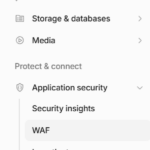
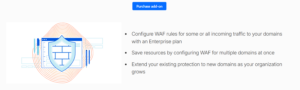
It seems the obvious option, so click it and… oh. If you are on a free account, you’ll be offered the chance to purchase an account wide WAF:
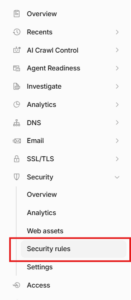
The correct place we need to go (at least at the time of writing!) is Domains > Overview and click into the relevant domain name. Once there, navigate the left menu panel again and under Security you should find Security Rules:
Rule One
Click Create Rule (currently a blue button) to add a new rule. The first rule will block all access to the xmlrpc.php endpoint:
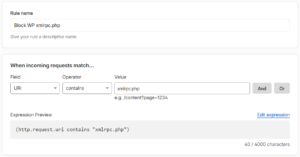
The action is simply to block:

Click “Deploy” to save and activate the rule.
Rule Two
The second rule adds a Cloudflare challenge as an extra check before access to the admin login page is allowed. Create another rule:
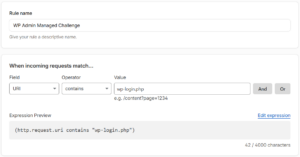
The action here is “Managed Challenge” rather than block:

Result
Once the rules are configured and active, they should start blocking attacks. CSR for the Admin Managed Challenge rule means Challenge Success Rate. So in this context, just 0.15% of requests to access the WordPress admin login page pass the Cloudflare challenge.

There’s no substitute for keeping WordPress (which includes themes and plugins) updated but shutting down or restricting common attack vectors adds an extra layer of defence.

